

How to Open a Chime Account?


This article explores the process of opening a Chime account, covering every step, eligibility requirements, benefits and practical tips to get the most out of your new account. Whether you’re tech-savvy or a digital banking newbie, this guide will have you banking smarter in no time.
What Is Chime?
Chime is an American financial technology company called a “neobank.” It started in 2013 and is based in San Francisco. Chime lets you open checking and savings accounts through its mobile app. These accounts are actually held by partner banks (The Bancorp Bank and Stride Bank), which are FDIC-insured, so your money is protected.
Chime offers helpful features like getting your paycheck up to 2 days early, fee-free overdrafts with SpotMe, automatic savings, and a credit-builder card. There are no monthly charges or minimum balance rules.
Why is Chime a Good Choice for Online Banking?
Chime is a popular online bank because it helps you handle your money easily and without extra costs. Here are the main reasons so many people like it:
1) No minimum balance or hidden fees
Chime doesn’t require you to keep a certain amount of money in your account. There are no hidden fees or monthly charges. You won’t pay overdraft fees if you qualify for SpotMe, and there are no fees for using your card abroad. It’s great for people who want simple, fair banking without surprise costs.
2) Early direct deposit and automatic savings
With Chime, you can get your paycheck up to two days earlier than normal. It also helps you save money in easy ways. For example, Chime can round up your purchases to the nearest dollar and put the extra change into savings. You can also save part of every paycheck automatically. Chime pays interest on savings — 1.25% APY for regular savings, and 3.75% APY for Chime+ members who have qualifying direct deposits, which is higher than most banks.
3) User-friendly mobile app experience
Chime’s mobile app makes it simple to manage your money anytime, anywhere. You can view your balance, monitor your spending, deposit checks, and transfer money between accounts. You’ll also get instant alerts whenever you spend money. If your card gets lost, you can freeze it in the app. You can also find ATMs that don’t charge fees. Chime’s app is easy to use and has great reviews in the App Store and Google Play Store.
Step-by-Step: How to Open a Chime Account
Setting up a Chime online banking account is quick and can be done in under 2 minutes. The application process has only a few steps to get started with fee-free banking. Here’s how to open a Chime account:
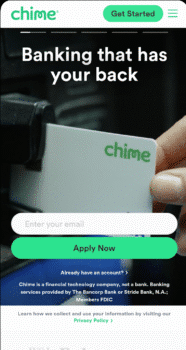
Step 1: Visit the Chime website.
Go to www.chime.com in your internet browser. When the page loads, look for the green button that says “Get Started.” Click on “Get Started.”

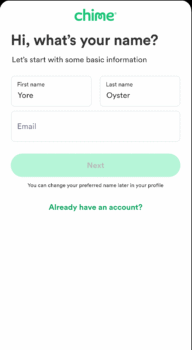
Step 2: Enter your personal information.
A form will appear asking for your first name, last name, and email address. Type your full legal name and a valid email address that you can access. When you are done, click the button that says “Next.”

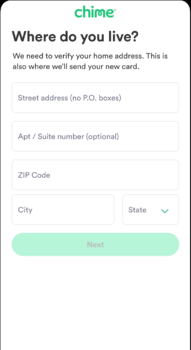
Step 3: Type in your mailing address.
Now type your home address, including your street, city, state, and zip code. You can’t use a P.O. Box. Chime needs a real street address so they can mail your debit card to you. Click “Next” when you’re done.

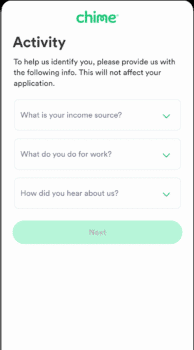
Step 4: Choose your source of income.
Chime will ask you about your source of income. This means they want to know if you have a job, get government benefits, or have any other kind of income. This does not affect whether you can open an account. It’s just for their records. Choose the right option for you and click “Next.”

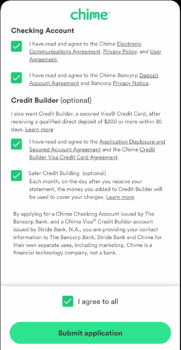
Step 5: Agree to the terms.
Read Chime’s Terms of Service and Privacy Policy. If you agree, click the box to show that you accept the terms. Click “Submit.”

Step 6: Verify your identity.
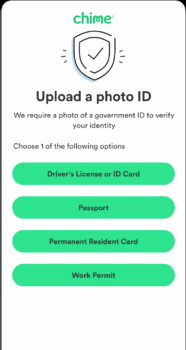
Chime will ask you to verify your identity. You will need to upload a clear photo of an ID, such as your driver’s license, passport, resident card, or work permit. Make sure your photo is taken in good light so the writing can be read easily.
Step 7: See your approval screen.
When your information is approved, you will see a confirmation screen that says your Chime account has been opened. You’ll receive both an account number and a routing number. Chime will also mail your Visa Debit Card to the address you entered.
What Happens After You Apply
After you submit your application, several things happen before you can fully access your new Chime banking services. Understanding what happens next helps with a smooth setup process when you open a Chime account.
Chime reviews your application
Once you’ve submitted your application, Chime uses a third-party verification system to confirm your personal information. This review process happens almost instantly and doesn’t involve credit checks. If your information can’t be verified, the application may be denied. Common verification issues are:
- Inaccurate personal details
- Already having an existing Chime account (only one account per person)
- Age or residency restrictions (must be 18+ and a U.S. citizen/resident)
If your application has verification challenges, you may be asked to upload a photo ID. Acceptable forms are unexpired U.S. driver’s licenses, state IDs, passports, passport cards, permanent resident cards or employment authorization cards.
Account approval and setup
After verification, Chime approves your account instantly. Yes, your account is available immediately after approval. During this stage you’ll receive:
- Your account and routing numbers
- Access to online banking features
- Instructions to set up mobile banking
Of course, your funds in a Chime account are FDIC-insured up to $250,000 through partner banks (Stride Bank, N.A. or The Bancorp Bank, N.A.). This means your money is safe even if Chime itself is not a bank.
Receiving your Chime Visa debit card.
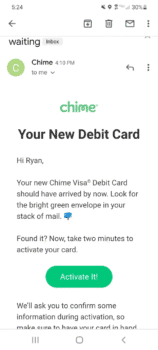
After approval, Chime will personalize your Visa debit card and mail it to you within one business day. Your card will be delivered to your provided address within 7–10 business days. The card will come in a green envelope, so watch for that in your mailbox.
To activate your new Chime Visa debit card:
- Log in to your Chime account
- Locate the card status widget showing “Your card was delivered.”
- Tap the “Activate” button
If your card doesn’t arrive within 10 business days, it may be lost in transit and you’ll need to request a replacement through the Chime app.

Getting Started with Your New Chime Account
Once your Chime account is active, to get the most out of it, you need to set up some basic banking features. Setting up direct deposit, linking external accounts and understanding mobile features turns your basic account into a full financial tool.
How to set up direct deposit
Setting up direct deposit with Chime gives you premium benefits like early access to your paycheck (up to 2 days before payday). You can do it in 3 ways:
- In the Chime app, tap “Move Money” then “Set up direct deposit” to copy your routing and account numbers to share with your employer
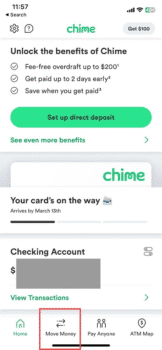

- Tap “Get completed form,” and Chime will email you a pre-filled direct deposit form along with a voided check.
- Use the “Find employer” option if your employer is one of the 30,000+ employers in the Chime database
You can also automatically split your direct deposit between your Checking, Savings and Credit Builder accounts by setting specific percentages for each.
Linking external accounts
Linking your existing bank accounts to Chime allows for seamless fund transfers. To link an external account:
- Open the Chime app and click on “Move tab.”
- Select “From” and choose “Add another account.”
- Pick “Bank Account” and follow the prompts
Alternatively, access this feature through Settings > Linked Accounts > Link a New Account. Once linked, external accounts appear in a convenient widget on the home screen for iOS users, making transfers straightforward.
Mobile check deposit and alerts
Mobile check deposit is available immediately after you activate your physical Chime card. To deposit a check:
- Open the Chime app and tap “MoveMoney ” at the bottom
- Select “Mobile Deposit Check.”
- Sign the back of your check
- Follow in-app instructions to photograph both sides
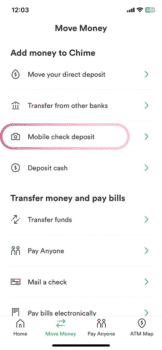
Check processing takes 3-5 business days, but smaller amounts often clear faster. For best results, place checks against a dark background in good lighting with all 4 corners visible.
Configure transaction alerts by going to Settings > Notifications and toggling on/off based on your preferences to stay informed about account activity instantly.
FAQs
Is Chime Right for You?
Chime is a great choice if you prefer mobile-first banking with no fees, early paycheck access, automated savings, and user-friendly tools but you’re okay with digital-only support, limited ATM access, and potential hiccups like account closures. It’s especially popular with younger users or those avoiding traditional bank fees.
Who can open a Chime Account?
Anyone who is at least 18 years old, a U.S. citizen or permanent resident, has a valid Social Security number, and a valid U.S. mailing address can open a Chime account. Chime doesn’t run a credit check when you open an account, making it a good option even if you’re working to rebuild your credit.
Can I open a Chime Account with bad credit?
Yes. Chime doesn’t run a credit check when you open an account. It’s a great option if you’re rebuilding your financial life.
Conclusion
Opening a Chime account is one of the simplest ways to upgrade your financial life. Chime is transforming modern banking with its no-fee approach, early paycheck access, robust savings tools, and intuitive app. In under two minutes, you can join millions who have chosen Chime for a smarter, simpler way to manage their money. Whether you want to escape bank fees, save more automatically or have a slick mobile app, Chime is worth a look.
Ready to take control? Go to Chime.com or download the Chime app today!
Other Banking choices